
Master Email Automation: Build Multi-Step Email Funnels That Convert
Master Email automation isn’t just about scheduling messages. It’s about building a system that talks to the right person at the right moment.
A well-built multi-step funnel works while you sleep. It nurtures leads, onboards customers, and wins back people who’ve gone quiet.
This guide gives you a practical framework to design, build, and optimize funnels that actually convert — plus four ready-to-use templates.
What Is a Multi-Step Email Funnel?
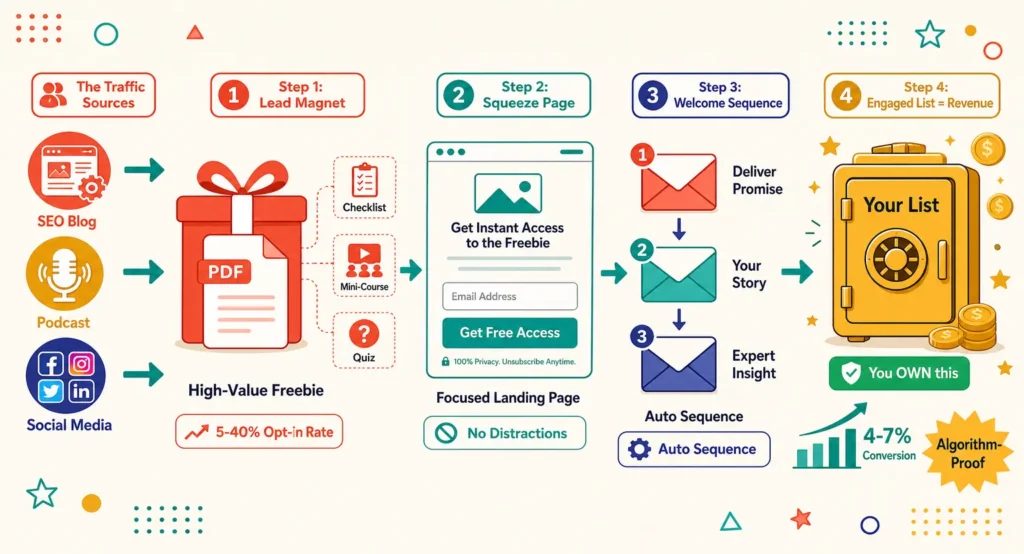
A multi-step email funnel is a sequence of automated emails triggered by a specific action or timeline.
Instead of one blast to everyone, you send a series of targeted messages. Each email moves the reader closer to a goal — a purchase, a login, a renewal.
Welcome sequences alone typically see far higher open rates than standard campaigns, often 2–3x higher. That’s because timing and relevance matter more than almost anything else in email.
Drip sequences also outperform single emails on clicks and conversions. Multiple touchpoints simply beat one shot.
The Core Framework
Before building anything, define six things for every funnel:
1. Goal. What action do you want the reader to take by the end?
2. Audience segment. Who specifically is entering this funnel?
3. Trigger. What event starts the sequence?
4. Messaging map. What does each email say, in order?
5. Timing. How many days between each step?
6. KPIs. How will you measure success at each stage?
Write these six elements down before you draft a single subject line. It keeps the funnel focused and easy to optimize later.
Step 1: Map the Customer Journey
Start by plotting your customer’s path. Most journeys follow a similar shape:
Awareness → Sign-up → Activation → Purchase → Retention → Advocacy
Each stage needs its own funnel, not one giant sequence trying to do everything.
Ask yourself: where do people drop off today? That’s usually your first funnel priority.
Step 2: Choose Your Triggers
Triggers are what start the automation. Common ones include:
- Newsletter or account sign-up
- First login or product activation
- Completed purchase
- Cart abandonment
- Inactivity after X days
- Subscription renewal date
Trigger-based emails outperform generic blasts because they’re tied to real user behavior. The email arrives exactly when it’s relevant.
Step 3: Build the Messaging Map
Plan each email’s single purpose. Don’t cram multiple asks into one message.
A simple rule: one email, one job. Welcome. Educate. Offer. Remind. Recover.
Keep subject lines specific and benefit-driven. Keep body copy short — readers scan, they don’t study.
Step 4: Set Timing and Segmentation
Timing should match user intent, not your internal calendar.
A welcome email should send within minutes of sign-up. A re-engagement email might wait 30–60 days of inactivity.
Segmented and personalized emails consistently deliver higher open and click-through rates than one-size-fits-all campaigns. Segment by:
- Signup source
- Purchase history
- Engagement level
- Plan or product tier
- Geography or timezone
Even basic segmentation — new vs. returning customer — meaningfully lifts performance.
Step 5: Define KPIs Per Stage
Don’t just track opens. Track the metric that matters at each stage:
- Welcome: open rate, click rate
- Onboarding: activation rate, feature adoption
- Post-purchase: repeat purchase rate, average order value
- Re-engagement: reactivation rate, unsubscribe rate
Review these numbers on a schedule — monthly for active funnels, quarterly for stable ones.
Four Ready-to-Use Funnel Templates
Template 1: Welcome Sequence
Goal: Introduce the brand and set expectations. Trigger: New subscriber or account signup.
| Timing | Purpose | |
|---|---|---|
| 1 | Immediately | Welcome + set expectations |
| 2 | Day 2 | Share your story / value proposition |
| 3 | Day 4 | Highlight best content or products |
| 4 | Day 7 | Soft call-to-action (subscribe, browse, book) |
KPI focus: open rate, click-through rate.
Template 2: Onboarding Sequence
Goal: Drive product activation for new users. Trigger: Account created or trial started.
| Timing | Purpose | |
|---|---|---|
| 1 | Day 0 | Getting-started checklist |
| 2 | Day 1 | Highlight core feature #1 |
| 3 | Day 3 | Highlight core feature #2 |
| 4 | Day 5 | Case study or social proof |
| 5 | Day 7 | Check-in + support offer |
KPI focus: activation rate, feature adoption, trial-to-paid conversion.
Template 3: Post-Purchase Upsell / Reorder Sequence
Goal: Increase repeat purchases and order value. Trigger: Completed purchase.
| Timing | Purpose | |
|---|---|---|
| 1 | Day 0 | Order confirmation + delivery info |
| 2 | Day 3 | Usage tips / how to get the most from it |
| 3 | Day 10 | Complementary product recommendation |
| 4 | Day 30 | Reorder reminder or loyalty offer |
Post-purchase follow-ups like these often generate meaningfully higher incremental revenue than single-touch campaigns.
KPI focus: repeat purchase rate, average order value.
Template 4: Re-Engagement Sequence
Goal: Win back inactive subscribers or customers. Trigger: No activity for 30–90 days.
| Timing | Purpose | |
|---|---|---|
| 1 | Day 0 | “We miss you” + reminder of value |
| 2 | Day 4 | Incentive or exclusive offer |
| 3 | Day 8 | Final notice / preference update |
| 4 | Day 12 | Sunset or list-cleaning email |
KPI focus: reactivation rate, unsubscribe rate, list health.
Common Mistakes to Avoid
Too many emails, too fast. Give readers room to breathe between messages.
One CTA per campaign, but ten CTAs per email. Confusing readers kills conversion.
Ignoring mobile formatting. Most emails are opened on phones — check every template there.
Never testing. Funnels built once and never revisited quietly decay over time.
No exit criteria. Make sure customers stop receiving onboarding emails once they’ve converted.
Testing and Optimization
Treat every funnel as a living system, not a one-time project.
Run A/B tests on subject lines, send times, and CTA placement — one variable at a time.
Test sequencing too. Sometimes moving an offer earlier or later changes everything.
Review performance quarterly at minimum. Customer behavior shifts, and funnels should shift with it.
Tools That Support Multi-Step Funnels
Most modern platforms support visual workflow builders, conditional logic, and behavioral triggers. Look for:
- Visual automation builder
- Behavior and event-based triggers
- Native segmentation
- Built-in A/B testing
- Clear analytics per funnel stage
The right tool matters less than the strategy behind it. A simple platform used well beats a powerful one used poorly.
Final Thoughts
Multi-step funnels turn one-time interactions into ongoing relationships.
Start small. Build one funnel — welcome or onboarding — get it right, then expand.
Automated, timely, and personalized emails consistently outperform generic blasts. The framework above gives you the structure. The templates give you the starting point.
Now it’s time to build.