
You have built an app now you need to get people to find it. With over 5 million apps competing across Google Play and the App Store getting your app noticed is really important. That is where App Store Optimization comes in. Think of App Store Optimization as Search Engine Optimization for your app listing. Done right App Store Optimization drives a stream of installs without using up your ad budget.
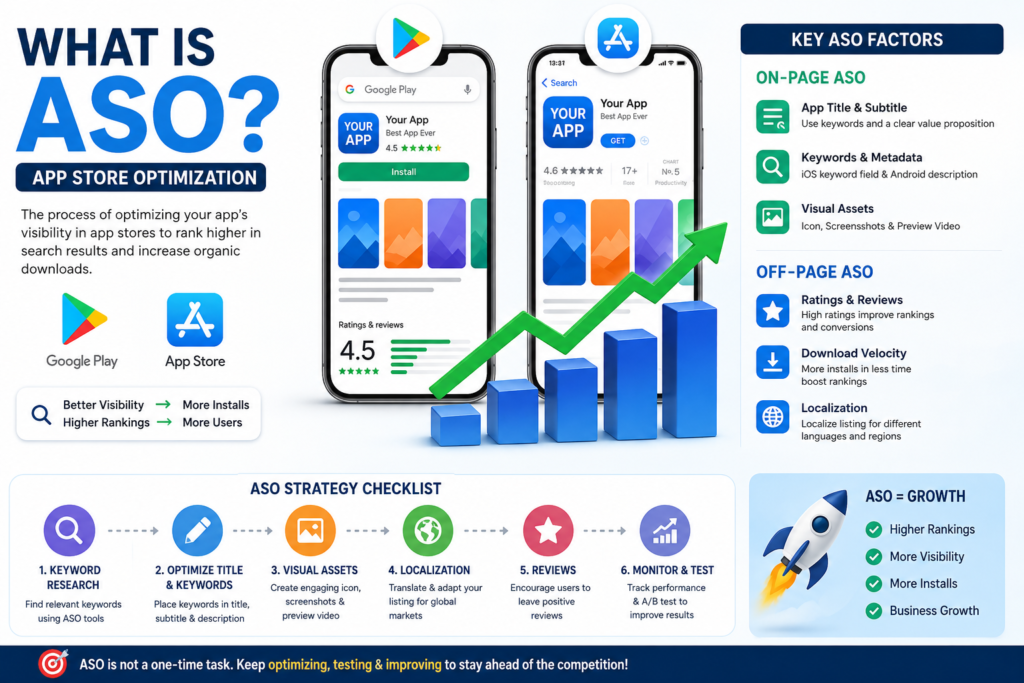
What is App Store Optimization exactly? App Store Optimization is the process of improving your apps visibility in app store search results and increasing the likelihood that someone who sees your App Store Optimization listing will actually download your app. App Store Optimization has two parts:
- On-page App Store Optimization, which’s everything inside your App Store Optimization listing: title, keywords, description, icon, screenshots and preview video.
- Off-page App Store Optimization, which is external signals like ratings, reviews, download velocity and backlinks.
Both Google Play and the App Store consider these App Store Optimization factors. They weigh them differently. That is why a one-size-fits-all approach rarely works for App Store Optimization.
Google Play vs Apple App Store: Key Differences
Understanding the differences between the two platforms is crucial before you start optimizing your app with App Store Optimization. Here are some key differences:
- Keyword indexing: Google Play indexes your description while Apple App Store gives you a dedicated keyword field for App Store Optimization.
- A/B testing: Both platforms have built-in A/B testing tools for App Store Optimization.
- Review response: Both platforms allow public review responses for App Store Optimization.
The Core On-Page App Store Optimization Factors
- App title: This is your ranking signal on both platforms for App Store Optimization. Lead with your app name then follow with a concise value proposition using your keyword.
- Keywords and Metadata: Use the keyword field strategically on iOS for App Store Optimization. Integrate keywords naturally into your description and long description on Android for App Store Optimization.
- Visual Assets: Icon, Screenshots and Preview Video are important for closing the deal with App Store Optimization. Your icon should be distinctive your screenshots should tell a story and your preview video should be engaging.
Off-Page App Store Optimization Factors That Move Rankings
- Ratings and Reviews: Ratings affect both your conversion rate and your algorithmic ranking for App Store Optimization. Apps with ratings consistently outperform rated competitors in search results for App Store Optimization.
- Download Velocity: A sudden spike in installs tells the algorithm that your app is trending for App Store Optimization.
- Localization: Localizing your store listing for target markets can give you a significant lift in installs for App Store Optimization. It is not about translating the description but about adapting screenshots and adjusting keyword strategies for App Store Optimization.
How to Measure App Store Optimization Success
Track these core metrics monthly for App Store Optimization:
- Keyword rankings for App Store Optimization
- Conversion rate for App Store Optimization
- installs for App Store Optimization
- Ratings trend for App Store Optimization
Use tools like AppFollow, Sensor Tower, AppTweak or MobileAction to track your keyword rankings and competitor benchmarking for App Store Optimization.
Quick-Start App Store Optimization Checklist
- Research target keywords using an App Store Optimization tool
- Optimize your title with your keyword for App Store Optimization
- Fill the iOS keyword field for App Store Optimization
- Rewrite description for Android with keywords for App Store Optimization
- Design and A/B test icon variants for App Store Optimization
- Create benefit-led screenshots with captions for App Store Optimization
- Set up a review prompt at a high-satisfaction moment in your app for App Store Optimization
- Localize listing for top international markets for App Store Optimization
By following these steps and tracking your metrics you can improve your apps visibility with App Store Optimization. Drive organic installs with App Store Optimization. Remember, App Store Optimization is a process that takes time and effort. It is worth it in the end for App Store Optimization.
● [ ] Set a review schedule for the performance of the keywords for App Store Optimization
The process of improving the visibility of an app in the store with App Store Optimization is not something you do once. Then forget about. It is something you have to keep working on all the time with App Store Optimization. You have to try things see what works and make changes to get results with App Store Optimization.
The apps that are, at the top of the store rankings do not always have the money to spend. They are the ones that think of their app listing as a product that needs its attention and care with App Store Optimization.
Begin with the title of your app and the keywords you want to use for App Store Optimization. The rest of the work will follow from this for App Store Optimization. The keywords are very important so you need to review the performance of the keywords every month for App Store Optimization.