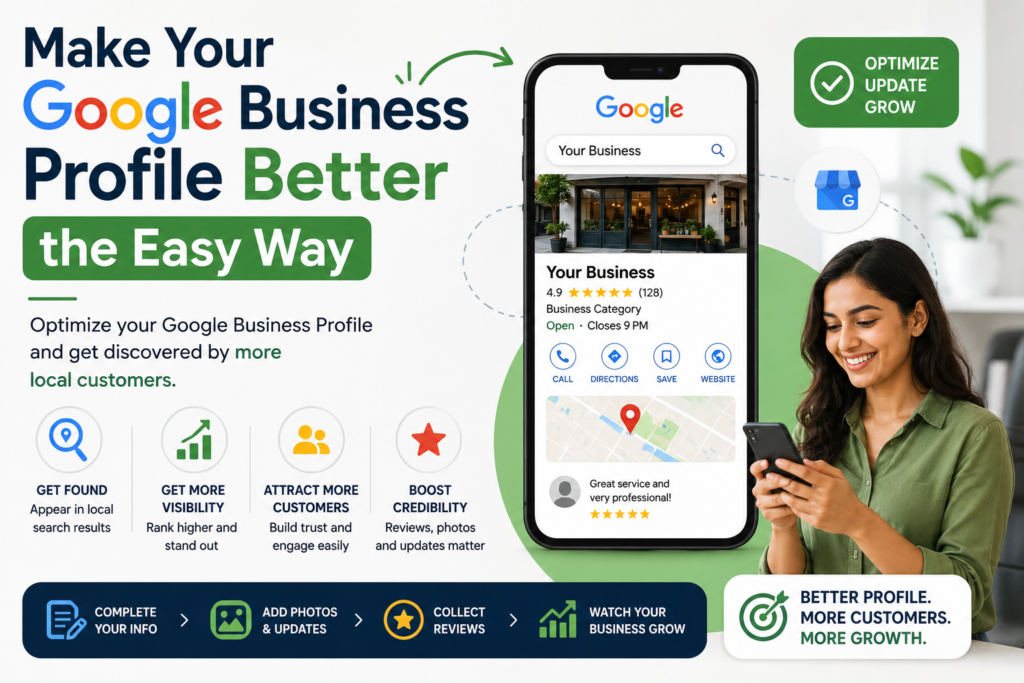

Lots of people use Google to find things near them. They might even visit a business on the day they search for it. If your Google Business Profile is not complete you will miss out on people visiting your business and the money they could bring in.
1. Claim Your Business on Google
First you need to find your business on Google. Search for your business name on Google then go to the Google Business Profile Manager. If your business is already listed you need to claim it. If not you need to create a listing. You will need to verify your Google Business Profile, which means proving you are the owner of your Google Business Profile. You can do this by mail, phone, email or video.Useful for managing and editing your profile information.
2. Fill Out All the Information About Your Google Business Profile
You need to fill out all the information about your Google Business Profile. This includes your business name, address, phone number, website, hours of operation and what you sell at your business. If you do not fill out all the information about your Google Business Profile it can look like your business is not trustworthy. Google says customers are more likely to visit a business if the Google Business Profile is complete. A complete Google Business Profile helps customers trust your Google Business Profile and your business. Your Google Business Profile and business are very important. You should focus on making your Google Business Profile complete just like you focus on your business.
3. Choose the Right Categories for Your Google Business Profile
You need to choose the categories for your Google Business Profile. For example if you have a restaurant choose Restaurant as the category for your Google Business Profile. You can also add categories if your business offers services. Add attributes like wheelchai or free Wi-Fi to your Google Business Profile. The right categories help customers find your Google Business Profile and your business. Make sure to choose categories that’re relevant to your business and what you do.
4. Add Photos and Videos to Your Google Business Profile
You need to add photos and videos to your Google Business Profile. This can help people find your Google Business Profile and make it look more trustworthy. Add a logo, a cover photo and photos of your business and products. Update your photos regularly on your Google Business Profile to keep it looking fresh and new. Your Google Business Profile needs photos to showcase your business like a store needs a window display.
5. Post Updates on Your Google Business Profile
You need to post updates on your Google Business Profile. This can be news, offers or events. Try to post least twice a week on your Google Business Profile. This will help keep your Google Business Profile looking active and attract customers to your business.
6. Manage Your Reviews on Google
You need to manage your reviews on Google. Respond to all reviews, including ones on your Google Business Profile. Ask your customers to leave reviews and respond to them quickly on your Google Business Profile. This will help build trust with your customers and improve your Google Business Profile and business. Reviews on your Google Business Profile are important for building credibility like word of mouth.
7. Use the Q&A Section on Your Google Business Profile
You need to use the Q&A section on your Google Business Profile. Customers can ask questions about your business and your Google Business Profile. Add answers to the questions on your Google Business Profile. Monitor the section for questions on your Google Business Profile.
8. Check Your Insights on Google
You need to check your insights on Google. This will show you how customers are finding your Google Business Profile and what they are doing on your Google Business Profile. Use this information to improve your Google Business Profile and attract customers to your business. Insights on your Google Business Profile are useful for making data-driven decisions like checking your businesss financials.
9. Keep Your Information Consistent Across All Platforms
You need to keep your business information consistent across all platforms including your website, social media and directory listings. If your information is not consistent it can confuse Google and your customers.
10. Update Your Google Business Profile Regularly
You need to update your Google Business Profile. This means changing your hours, services and location if they change. Update your Google Business Profile if you have any events or offers. Your Google Business Profile should be up-to-date to reflect your businesss status.
Your Weekly Google Business Profile Routine
Check for reviews on your Google Business Profile. Respond to them away on your Google Business Profile.
Check your insights for the week on Google.
Post an update on your Google Business Profile.
Check your hours. Make sure they are accurate on your Google Business Profile.
Check your business information. Make sure it is consistent on Google.
Treat your Google Business Profile like a living thing. Update it regularly. Check it often. This will help you attract customers and build trust with them on Google. A good Google Business Profile helps your business grow and succeed. Your Google Business Profile is very important to your business. Google Business Profile is a key to success. Focus, on your Google Business Profile to achieve success. Your Google Business Profile and your business will benefit from it.