

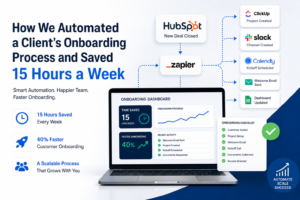
Client onboarding automation saves time. It also helps teams onboard new customers much faster.A fast-growing software company relied on manual onboarding. The team copied data between tools, sent emails one by one, and scheduled every kickoff call by hand. We used client onboarding automation to streamline the entire workflow and save 15 hours every week.
We helped them fix this problem in just six weeks. First, we mapped the entire onboarding process. Then, we automated the repetitive tasks. As a result, the company now saves 15 hours every week. New customers get started 40% faster. The process is also no longer dependent on one persons memory.
Here is how we did it and how you can do the thing.
The Problem With Manual Client Onboarding
Before we helped them onboarding a new customer was a long process. Here is what they had to do:
- The sales person had to create a record in the customer relationship management tool.
- The operations lead had to copy that data into a project management tool.
- They had to write and send every email manually.
- Next, they created a Slack channel for each customer.
- After that, they scheduled a kickoff call through several email exchanges.
None of these steps were difficult on their own. However, repeating them for dozens of new customers every month created a lot of administrative work. Overall, the team spent around 15–18 hours every week on repetitive tasks. They needed that time for important things.
How We Planned the Client Onboarding Automation Workflow
We did not try to automate everything at once. We started by looking at the workflow and identifying every point where something had to be passed from one person to another. We asked ourselves if each step required judgment or if it was just moving data around.
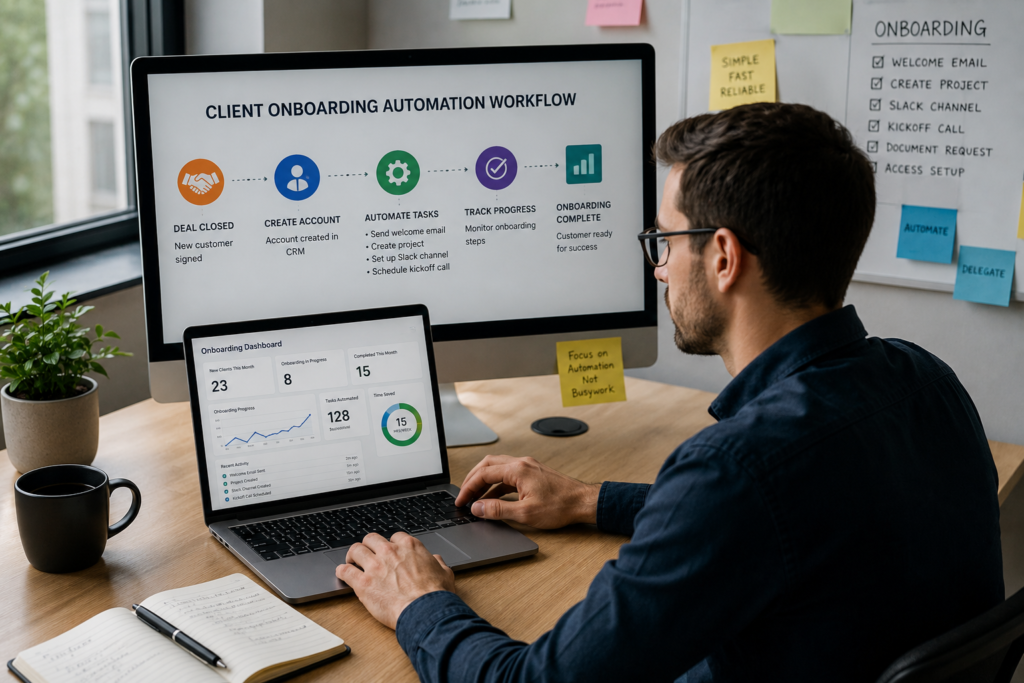
Step 1: Start Your Client Onboarding Automation with a CRM
First, we made the customer relationship management tool the central hub. Instead of automating everything at once, we focused on the highest-impact tasks. Finally, we added automated checks to keep the workflow running smoothly.
Step 2: Client Onboarding Automation for Data Synchronization
Next, customer data flows automatically from the customer relationship management tool to the project management tool, billing system, and Slack workspace. As a result, no one has to copy and paste information. No one has to copy and paste data anymore.
Workflow automation platforms like Zapier connect hundreds of business applications and eliminate repetitive manual tasks. Read the Zapier Automation Examples guide for practical ideas.
Step 3: Client Onboarding Automation for Emails and Scheduling
After that, welcome emails, document requests, and scheduling links are sent automatically. In addition, every message is personalized using customer data. They are personalized with information from the customer relationship management tool.
Step 4: Add Automated Checks to Your Client Onboarding Automation
Finally, we added automated checks. If something needs attention, the system sends an alert immediately. Otherwise, the workflow continues without interruption. It does not bother them for things.
Step 5: Track Everything in One Place.
Finally, the spreadsheet was replaced with a live dashboard. This dashboard updates automatically, giving everyone access to the latest onboarding status.
Tools Used for Client Onboarding Automation
- Customer relationship management tool: HubSpot (as the central hub and automation trigger)
- Automation tools: Zapier and Make for workflows between tools
- Project management: ClickUp for internal task tracking
- Scheduling: Calendly, embedded in automated emails
- Communication: Slack, with automated channels per customer
- Dashboard: A lightweight internal tool built on Airtable
Client Onboarding Automation Results
To measure the impact, we tracked the time spent on onboarding before and after automation. Each team member logged their tasks for two weeks before the changes and for another two weeks after automation was introduced.
- As a result, the operations team saves around 15 hours every week.
- Meanwhile, new customers get started around 40% faster.
- Onboarding completion rate: Increased, because automated reminders helped reduce drop-offs from missing documents
- In addition, saving 15 hours every week equals about $3,000 in monthly capacity at an average labor cost of $50 per hour
Challenges and Solutions
Losing the Personal Touch. However, automated emails can sometimes feel impersonal. We solved this by keeping the touchpoints human and automating everything in between.
Many Tools. Likewise, adding automation without a plan can create confusion. We limited the tools to five ones. We documented every workflow.
Special Cases. Of course, not every customer follows the same onboarding journey. We built override triggers so the operations team could pause automation for -standard accounts.
Checklist for Your Own Onboarding Automation
- Hours spent on onboarding tasks
- Time to get started (from sign-up to first meaningful outcome)
- Onboarding completion rate
- Number of handoffs per customer
- Customer satisfaction score after onboarding
- Error rate from data entry
- Internal cost per onboarded customer
Conclusion
Ultimately, onboarding automation is not about replacing people. Instead, it removes repetitive work so your team can focus on customers. It is, about removing humans from the parts of the process that do not need them so your teams time goes toward building customer relationships.
If your team still manages onboarding across several tools, automation could save 10–15 hours every week. More importantly, it creates a faster and more consistent customer experience.
Want to know how much time you could save? Schedule a call today. Our team will map your workflow, identify the biggest automation opportunities, and show you exactly where automation can deliver the most value.